The best Apple Reminders alternative for your Mac depends on what Reminders is missing for you. Things 3 and OmniFocus 4 go deeper on planning, Todoist and TickTick sync to every platform, and Microsoft To Do is free with a Microsoft account. Any.do pairs a planner with a free tier, and MacTodo is a free list that stays on your Mac with no account.
Below: why people switch, a side-by-side table, what each app does best, and how to choose. Prices are US list prices checked in October 2026 and can differ by country, so confirm them on each official pricing page before you buy.
The short answer
- Stay with Apple Reminders if you share lists with family or want alerts when you arrive somewhere. It’s free and syncs across your Apple devices.
- For deep planning on Apple devices, choose Things 3 (one-time price) or OmniFocus 4 (one-time or subscription).
- If you also use Windows or Android, choose Todoist or TickTick. Both have free plans with limits.
- Microsoft To Do is completely free with a Microsoft account. MacTodo is free with no account at all, but it only runs on the Mac.
Why look for an Apple Reminders alternative on Mac?
Reminders is better than its reputation. It’s free, it reads dates you type (“Pay bills on Saturday”), it has interactive desktop widgets, and it shares lists with family. On a Mac, though, a few gaps send people looking:
- The best features need iCloud. Smart Lists, subtasks, tags, list groups, and sharing need updated iCloud reminders, and reminders in Google or Exchange accounts miss some features. More in Apple Reminders without iCloud.
- There’s no menu bar list. Reminders has no menu bar item of its own, so seeing today means opening the app or adding a widget. See menu bar to-do lists for Mac.
- Capture is limited. On macOS Tahoe 26 and later, Spotlight can run an Add Reminder action, and Siri works, but there’s no quick-entry window that floats over any app.
- It’s Apple-only. On a Windows PC you use iCloud.com in a browser, because updated reminders don’t show in the iCloud for Windows app. There’s no Android app.
- Planning depth. If you run multi-step projects, dedicated planners add structure Reminders doesn’t aim for: areas, project headings, start dates separate from deadlines, and regular reviews.
Before you switch, list what you’d lose. Shared lists with assigned reminders, alerts when you arrive at or leave a place, and free sync to iPhone and Apple Watch are hard to replace for free. Plenty of people keep Reminders for the family grocery list and use another app for everything else.
Apple Reminders alternatives compared
Here’s how the seven compare with Reminders on price, platforms, and sync. “Best for” is our one-line take on who each app suits.
| App | Price (US) | Runs on | Sync and account | Best for |
|---|---|---|---|---|
| Apple Reminders | Free, built in | Mac, iPhone, iPad, Apple Watch, iCloud.com | iCloud, with your Apple Account | Shared family lists and location alerts |
| Things 3 | $49.99 Mac, $9.99 iPhone, $19.99 iPad, each one-time | Mac, iPhone, iPad, Apple Watch, Vision Pro | Free Things Cloud account, optional on one device | Calm, structured personal planning |
| OmniFocus 4 | $74.99 Standard or $149.99 Pro one-time, or $99.99/year | Mac, iPhone, iPad, Apple Watch, Vision Pro, web (with a subscription) | Omni Sync Server (Omni Account) or your own WebDAV server | Detailed GTD-style systems |
| Todoist | Free; Pro $5/month billed yearly or $7 monthly | Mac, Windows, Linux, iPhone, iPad, Android, web | Todoist account | Every platform, shared projects |
| TickTick | Free; Premium $49.99/year | Mac, Windows, Linux, iPhone, iPad, Android, web | TickTick account | Tasks, calendar, habits, and focus in one app |
| Microsoft To Do | Free | Mac, Windows, iPhone, Android, web | Microsoft account | Outlook and Microsoft 365 users |
| Any.do | Free; Premium $4.99/month billed yearly or $7.99 monthly | Mac, Windows, iPhone, iPad, Android, web | Any.do account | A to-do list with a calendar view |
| MacTodo | Free; optional Pro $29 one-time | Mac only (macOS 14+) | No account and no sync; stays on your Mac | A private list on your desktop and menu bar |
Prices change, and most apps charge differently outside the US. Each section below links to the official pricing page.
Best for planning projects: Things 3 and OmniFocus 4
Things 3
Things is the closest thing to “Reminders, but more thoughtful”. Areas hold the parts of your life, Projects sit inside them with headings for phases, and every to-do can have a checklist, tags, notes, a When date, and a separate Deadline. You plan from Today, This Evening, Upcoming, and Someday, with your calendar events alongside. Press ⌃Space in any app for Quick Entry, and check off to-dos from interactive desktop widgets.
- Price: $49.99 for Mac, $9.99 for iPhone, and $19.99 for iPad, each one-time, with a 15-day Mac trial and free Things Cloud sync. See Things’ store page.
- Watch out for: no shared lists, no web app, and nothing for Windows or Android. Typed dates work in the When and Deadline fields, not in the title.
- Switching: File › Import › Import From Reminders brings your lists over as projects. Repeat schedules, flags, and location alerts don’t transfer.
We compare the two head to head in Things 3 vs Apple Reminders.
OmniFocus 4
OmniFocus is for people who run a full GTD-style system. It has projects, tags, defer dates for items you can’t start yet, a Forecast view with your calendar events, and a Review that prompts you to check your projects regularly. Quick Entry works from anywhere, and there are widgets. Pro adds custom perspectives (saved, filtered views), Focus Mode, and automation with Omni Automation and AppleScript.
- Price: a one-time universal license ($74.99 Standard or $149.99 Pro) covers Mac, iPhone, iPad, Apple Watch, and Vision Pro. Or subscribe for $99.99 a year, which includes Pro and the web app. See OmniFocus pricing.
- Watch out for: it needs macOS 15.2 or later, and there’s a lot to learn. If you don’t already think in GTD terms, Things is gentler.
Best for every device: Todoist and TickTick
Todoist
Todoist runs nearly everywhere: Mac, Windows, Linux, iPhone, iPad, Android, Apple Watch, Wear OS, the web, and browser extensions. You type dates straight into a task, including repeats like “every other Wednesday”, and a global Quick Add shortcut works even when the Mac app is minimized. Mac widgets work on macOS 14 and later, and you can share a personal project with up to five people, even on the free plan.
- Price: the free Beginner plan allows 5 personal projects and 3 filters. Pro costs $5 a month billed yearly, or $7 monthly, and adds custom reminders and a calendar layout. See Todoist pricing.
- Watch out for: you need a Todoist account, and the free plan’s project limit fills up fast if you keep many lists in Reminders.
TickTick
TickTick puts tasks, a calendar, a habit tracker, and a focus timer in one app. On the Mac, ⇧⌘O opens a mini window from the menu bar where you can see your tasks and start a focus session, and ⇧⌘A captures a task without leaving the app you’re in. It understands typed dates and syncs across Mac, Windows, Linux, iPhone, iPad, Android, and the web.
- Price: free with 9 lists and up to 99 tasks per list. Premium is $49.99 a year on TickTick’s site, and App Store pricing can differ. See TickTick Premium.
- Watch out for: you need a TickTick account, and the Mac app needs macOS 12 or later.
Free with an account: Microsoft To Do and Any.do
Microsoft To Do
Microsoft To Do is completely free. My Day is a daily planner with suggested tasks, tasks can have steps and one-time or repeating reminders, and you can share lists with family, friends, or coworkers. It syncs with Outlook tasks, which makes it the easy pick if your work runs on Microsoft 365. It runs on Mac (macOS 13 or later), Windows, iPhone, Android, and the web.
Watch out for: you need a Microsoft account to sign in and sync, and your tasks are stored in Microsoft’s cloud.
Any.do
Any.do pairs a to-do list with a calendar view and runs on Mac, Windows, the web, iPhone, iPad, and Android. The Personal plan is free. Premium adds repeating tasks, location reminders, WhatsApp reminders, color tags, and AI features, and the Family plan, for four members, adds a shared grocery list and shared projects.
- Price: Premium is $4.99 a month billed yearly, or $7.99 monthly. Family is $8.33 a month billed yearly. See Any.do pricing.
- Watch out for: repeating tasks are a Premium feature, so for routines the free plan does less than free Reminders.
Best for a private, Mac-only list: MacTodo
MacTodo is our app, so weigh this section with that in mind. It’s for people who don’t need their list on a phone and would rather it never left their Mac.
The to-do list is free. Type “Call mum tomorrow 6pm” or “Pay rent monthly !! #Work” and MacTodo sets the reminder, the repeat, the priority, and the category. You get repeats, steps, priorities, categories, Today and Upcoming views, and notifications you can mark done or snooze for an hour. Today’s list and a quick-add field live in the menu bar, ⌃⌥Space opens quick add over any app, and among its to-do widgets for your Mac desktop is one where you check off to-dos right on the desktop. Shortcuts, Siri, and Spotlight work too.
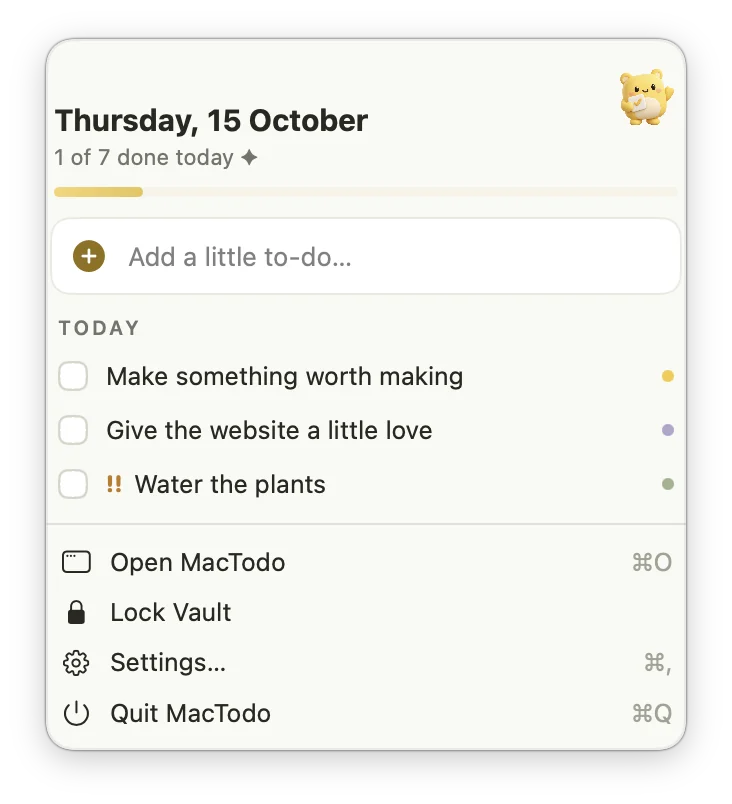
- Price: free for to-dos, with no account and no ads. An optional Pro upgrade ($29 one-time, normally $79) adds notes, saved links, documents, a prompt library, and an encrypted vault.
- Runs on: macOS 14 Sonoma or later, on Apple silicon and Intel, so it also suits Intel Macs staying on macOS Tahoe 26.
- Watch out for: no iPhone app, no iCloud sync, no shared lists, no calendar view, and no location reminders. Typed dates are understood in English.
Using Things as well? Its Quick Entry with Autofill also defaults to ⌃⌥Space. Change MacTodo’s shortcut in Settings so they don’t clash.
See how the to-do list works, or get the free download.
How do you choose the right Reminders alternative?
Start from what Reminders gets wrong for you, not from feature lists.
| If you need… | Look at |
|---|---|
| Your list on iPhone and on Windows or Android | Todoist, TickTick, Microsoft To Do, or Any.do |
| Lists shared with family or coworkers | Reminders itself, Todoist, TickTick, or Microsoft To Do |
| Deep project planning on Apple devices | Things 3 or OmniFocus 4 |
| A one-time price instead of a subscription | Things 3, an OmniFocus 4 license, or MacTodo |
| No account and nothing in the cloud | MacTodo, or Things on a single device without Things Cloud |
| Free, with no trial clock | Microsoft To Do, MacTodo, or the free plans of Todoist, TickTick, and Any.do |
- Write down the two or three things Reminders gets wrong for you.
- Pick one app from the table that fixes them. Trying five at once is how tasks get lost.
- Move only this week’s tasks at first, or use an import if the app has one, like Things’ Import From Reminders.
- Use it for a full week, including adding tasks from other apps and checking them off from a widget or the menu bar.
- Keep Reminders for shared family lists if your new app can’t share.
For the bigger checklist, from capture speed to privacy, read how to choose the best to-do app for Mac.